

Many a blog post of yore has extolled the time and effort-savings of using Components in projects.
But, unless you have multiple projects in the same Namespace (usually not recommended), you’ve been left to your own devices to figure out how to migrate Components, and any other resources for that matter, onto new Namespaces.
Today, we’ll fill in that gap by discussing four ways to share resources, especially Components, across Namespaces.
Method #1: Export Selected Resources
In the Vantiq Academy Applications Developer Foundations Course, students select from the Projects menu in the Nav Bar to import type data and images useful to their current projects. Exporting just a single or small number of resources is just as straightforward an endeavor.
From the Projects menu, choose Export… At the top of the Export panel, there’s a drop-down to choose from the projects in the Namespace, should there be more than one:
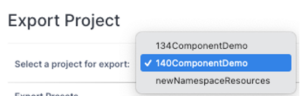
…followed by a complete listing, by category, of all the resources in the project:
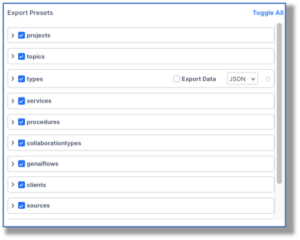
By default, everything but type data is toggled on, but the developer can select as many or as few resources as desired.
If the developer chooses to toggle “off” the projects tab, then the export will be just the collection of selected resources dissociated with a project. To access these resources, once they’ve been imported, find them in the listings from the Add –> <Resource> menu.
Here, I just want to export a standard Type and its data:
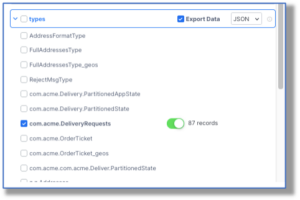
Upon importing it to the new Namespace, I can retrieve it for the current project from the Add –> Type menu:
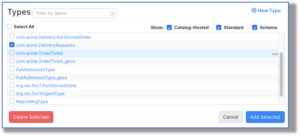
However, if the projects tab is “on,” a new project will be created, and the other checked resources will become part of that project.
Method #2: Make Components Available from a Catalog
Ok, technically, Components can’t be shared in a Catalog. But Assemblies can, and Components can be converted into an Assembly. Both Client Components and App Components can be made visible in Assemblies, too.
There are a few disadvantages to this approach:
- Not every resource can be made visible in Assemblies
- What is visible will be read-only
- Changes can be made to resources in the originating Assembly that will then put the installed Assembly “out of date.”
Still, if you’ve made an App or Client Component, and want to make them usable across multiple Namespaces, turn it into an Assembly, because the consumer can use it just like they would use a non-Assembly Component.
If you’re not familiar with what’s possible with Assemblies, take the class!
Method #3: Export/Import Resources from the CLI
In Vantiq’s Command Line Interface, the commands find and export save resource files to the local filesystem. The load command will either create or redefine the named resource into a different Namespace.
Using this tool, you could write a time-saving shell script to upload any number of resources into the Namespace of your choosing.
If you’re not familiar with what’s possible with Vantiq’s CLI, take the class!
Method #4: Org Resources
There may be certain resources you’d like to be part of every new Namespace you create, automatically. That can be done!
In order to set up default resources for every new Namespace in an Org, you either have to be an Org Administrator, or be friends with one. The steps are simple:
- Create a project, called newNamespaceResources with all the desired resources
- Projects –> Export the project into a zip file, and make sure its name is org/newNamespaceResources.zip
- In the Org Namespace, Projects –> Import the zip file as a Project
Thereafter, every developer that creates a Namespace in that Org will see those resources, if they choose the project from the Projects menu.
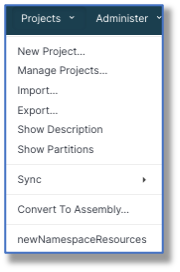
(Also, you will no longer get the Project Wizard popup upon entering the Namespace for the first time, because a Project already exists.)
There you have it; four ways to share resources across Namespaces. These four each have their practical applications…
But are there other ways to make resources available from one Namespace to the next? Short answer: Well, yes… Longer answer:
- Developers could create a partition of resources they want to share, and deploy them to other Namespaces. Click here to take the Deployment class.
- Or, they could upload them using the Vantiq VCS (Version Control System). (Why yes, as a matter of fact there’s a VCS class, too!)
Yes, there’re even more, but we’d start to move into Rube Goldberg territory…
Suffice it to say, in Vantiq there are almost always multiple ways to do something you want to do, including moving resources around Namespaces.
Thus, you have every reason to create Components and other resources for reuse in new projects, on new Namespaces, because migrating them to the places you’ll use them is easy!