

It started with an arrow.
I wanted to add one to my Client. There are multiple ways to do this, of course:
- Type something in a Text (StaticText) widget: “—>” (as awkward as -_-)
- Get a clipart arrow off of the Internet and use it in an Image (StaticImage) widget:

(A bit tricky if you’re going to use more than one and want them all looking alike. What’s that? You want to change the color now?)
- Or, I could use the HTML code in a HTML (StaticHtml) widget, which is what I did:
- From the Data Display palette, I dragged a HTML to the canvas
- Selecting the HTML widget, I typed in the raw HTML code:
- <div> <span>→</span> </div>
- Result:

Welp, that was underwhelming, but this is HTML and I can change things:
<div>
<span style=”font-size: 55px; color: blue” > <strong>→</strong></span>
</div>
Ah, that’s better: 
This humble beginning sparked my appreciation for this widget and began my exploration into all that is possible with StaticHTML, which turns out to be an awful lot. Here are just a few examples:
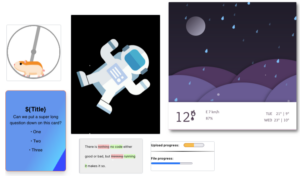
(It’s a pity that you can’t see the animations going on; use your imagination!)
There are four main elements to StaticHtml widgets on the Client. You won’t necessarily use them all, but be aware of them, starting with:
HTML:
When entering your HTML code, do make sure you have the Raw toggle checked. Otherwise, you’re working in WYSIWYG format.
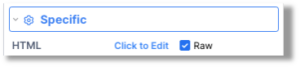
It’s a good idea to encase your code in its own <div> if there isn’t one already. Yes, you can include scripts. Check your browser docs to see what isn’t supported.
CSS:
Add CSS through the Custom Assets of the Client properties. Also, from the Advanced tab, toggle on the Apply Custom CSS Assets choice to see the CSS changes.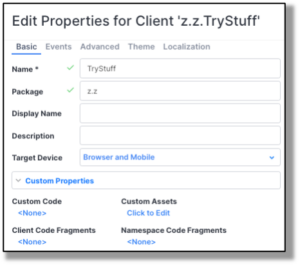
Data:
HTML widgets can accept data from data streams. When they do, they trigger the On Data Arrived event.
Template:
No, this isn’t somewhere in the ClientBuilder, but it’s awfully handy to use if you want your StaticHtml widget to … not be so static.
Care to see all four of these elements in action?
A Use Case: The Flipping Flashcard
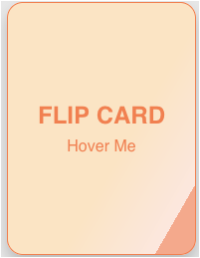 I found this “flip-card” on a site that listed a bunch of html-based widgets for free. (All credit to joe-watson-sbf.) It looks like a simple flashcard and animates a turn when the mouse hovers over it. Naturally, I had to have it.
Here’s what the HTML straight from the site looks like:
/* From Uiverse.io by joe-watson-sbf */
<div class=”flip-card”>
<div class=”flip-card-inner”>
<div class=”flip-card-front”>
<p class=”title”>FLIP CARD</p>
<p>Hover Me</p>
</div>
<div class=”flip-card-back”>
<p class=”title”>BACK</p>
<p>Leave Me</p>
</div>
</div>
</div>
I can plug this into the raw HTML of a HTML widget on a Client canvas.
Onward to the CSS:
/* From Uiverse.io by joe-watson-sbf */
.flip-card {
background-color: transparent;
width: 190px;
height: 254px;
perspective: 1000px;
font-family: sans-serif;
}
.title {
font-size: 1.5em;
font-weight: 900;
text-align: center;
margin: 0;
}
.flip-card-inner {
position: relative;
width: 100%;
height: 100%;
text-align: center;
transition: transform 0.8s;
transform-style: preserve-3d;
}
.flip-card:hover .flip-card-inner {
transform: rotateY(180deg);
}
.flip-card-front, .flip-card-back {
box-shadow: 0 8px 14px 0 rgba(0,0,0,0.2);
position: absolute;
display: flex;
flex-direction: column;
justify-content: center;
width: 100%;
height: 100%;
-webkit-backface-visibility: hidden;
backface-visibility: hidden;
border: 1px solid coral;
border-radius: 1rem;
}
.flip-card-front {
background: linear-gradient(120deg, bisque 60%, rgb(255, 231, 222) 88%,
rgb(255, 211, 195) 40%, rgba(255, 127, 80, 0.603) 48%);
color: coral;
}
.flip-card-back {
background: linear-gradient(120deg, rgb(255, 174, 145) 30%, coral 88%,
bisque 40%, rgb(255, 185, 160) 78%);
color: white;
transform: rotateY(180deg);
}
If all I do is set up the HTML and insert the CSS file into the ClientBuilder, I can change the HTML to have some legit, static question, and run the Client:
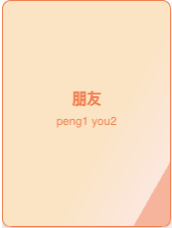
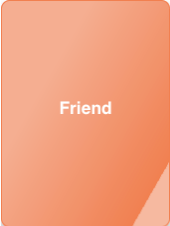
…and that’s that. We’ve all learned our Chinese word for the day, and we’ll keep learning it over and over again because it’ll never change.
But what if I don’t know what the question/answer will be yet?
No problem. First, let’s set the Data for the widget to be a Data Stream; (in this case, called Card1Stream). That stream will arrive with some vital information, and will also trigger the On Data Arrived event, which I’ve coded to be:
this.html = extra;
In other words, the entire HTML contents of the widget will be replaced with what comes through in the data stream.
This is where Templates come in. I’m going to create a Document that I’ll call CardTemplate, and set it up to swap in future variables. Look for the “${}” around them:
<div class=”flip-card”>
<div class=”flip-card-inner”>
<div class=”flip-card-front”>
<p class=”title”>${Title}</p>
<p><strong>${Question}</strong></p>
<p> ${Answer1}</p>
<p> ${Answer2}</p>
<p> ${Answer3}</p>
</div>
<div class=”flip-card-back”>
<p class=”title”>ANSWER</p>
<p>${Correct}</p>
</div>
</div>
</div>
I’ll collect the values I want through an event handler, and use a procedure to plug them into the right places, thanks to the built-in Template service procedures:
package edu.poc
PROCEDURE eduPOC2.FormatCard1(event)var refDoc = io.vantiq.text.Template.documentReference(“CardTemplate”)
var Correct
for (i in range(0,2,1)) {
if (event.Questions[0].Answers[i].isCorrect == true) {
Correct = event.Questions[0].Answers[i].Answer
}
}var inputs = {
Title : “What is 10 + 9?”,
Question : event.Questions[0].Question,
Answer1 : event.Questions[0].Answers[0].Answer,
Answer2 : event.Questions[0].Answers[1].Answer,
Answer3 : event.Questions[0].Answers[2].Answer,
Correct: Correct
}var htmlStream = io.vantiq.text.Template.format(refDoc, inputs)
return htmlStream
I can now send this reconstituted html as a data stream for the flashcard widget, where it will now display the question and possible answers on one side of the card, and finally the correct answer on the “flipped” side:
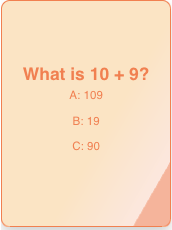
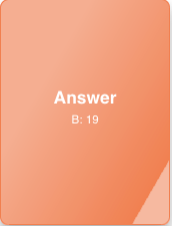
Easy peasy!
CAUTION!
I’d be most remiss if I didn’t relate a story about how your CSS files can affect the whole Namespace badly if you aren’t careful.
Once upon a time, I used an HTML widget to copy some cute animation of bubbles that reacted when a curser floated over them. (This was another website find.) I didn’t pay much attention to the fact that most of the divs and other entities in the HTML code weren’t given ids, and therefore the corresponding CSS was changing more general things, like <cue ominous music> unordered lists.
Errrr…. It turns out that there are a LOT of unordered lists in the whole IDE, and this one CSS file changed ALL of them to have more spacing, different fonts, etc. Suddenly, my whole environment was a complete mess!
This didn’t affect other Namespaces, thank goodness, but to fix my broken one, I exported the whole project, opened the zip file, defenestrated the offending CSS file, re-compressed the rest and reloaded the project into a new Namespace. Ooofff….
On a lesser note, CSS files in one Client in a Namespace can affect the look and feel of widgets in another Client on the same Namespace. This is easy to do if you’re using the same HTML in HTML widgets in separate Clients. The good news is that local CSS files will override what the CSS file from the other Client is affecting.
The overall moral to this story is that a developer should make sure that HTML elements in a Namespace have unique ids and classes to avoid CSS collisions.
Conclusion:
StaticHtml is the ultimate shape-shifter widget. Use them to fully customize the functionality of your Clients. Just take care that any added CSS is only changing the look and feel of what you want it to change(!)